Broken pages are one of the most common technical SEO issues affecting websites today. Whether caused by deleted content, URL changes, website migrations, or broken links, 404 errors can create a poor user experience and make it harder for search engines to crawl your site effectively.
That’s why SEO Repair Kit includes a powerful 404 Monitor feature that helps website owners identify, track, and resolve 404 errors before they impact rankings and visitors.
What Is a 404 Error?
A 404 error occurs when a visitor or search engine requests a page that no longer exists on your website.
Common causes include:
- Deleted pages
- Changed URLs
- Broken internal links
- Outdated backlinks
- Incorrectly typed URLs
- Website redesigns and migrations
When users encounter a 404 page, they are unable to access the content they expected, which often leads to frustration and increased bounce rates.
What Is 404 Monitor?
404 Monitor is a real-time error tracking system within SEO Repair Kit that automatically logs every 404 error occurring on your website.
Instead of manually searching for broken URLs, the system continuously monitors incoming requests and records valuable information that helps you identify and fix issues quickly.
Why Monitoring 404 Errors Matters
Many website owners don’t realize how many visitors land on missing pages every day.
Ignoring these errors can lead to:
- Poor user experience
- Lost website traffic
- Reduced engagement
- Wasted crawl resources
- Missed conversion opportunities
- Loss of valuable link equity
A proactive 404 monitoring strategy helps maintain a healthy website structure and ensures visitors reach the content they need.
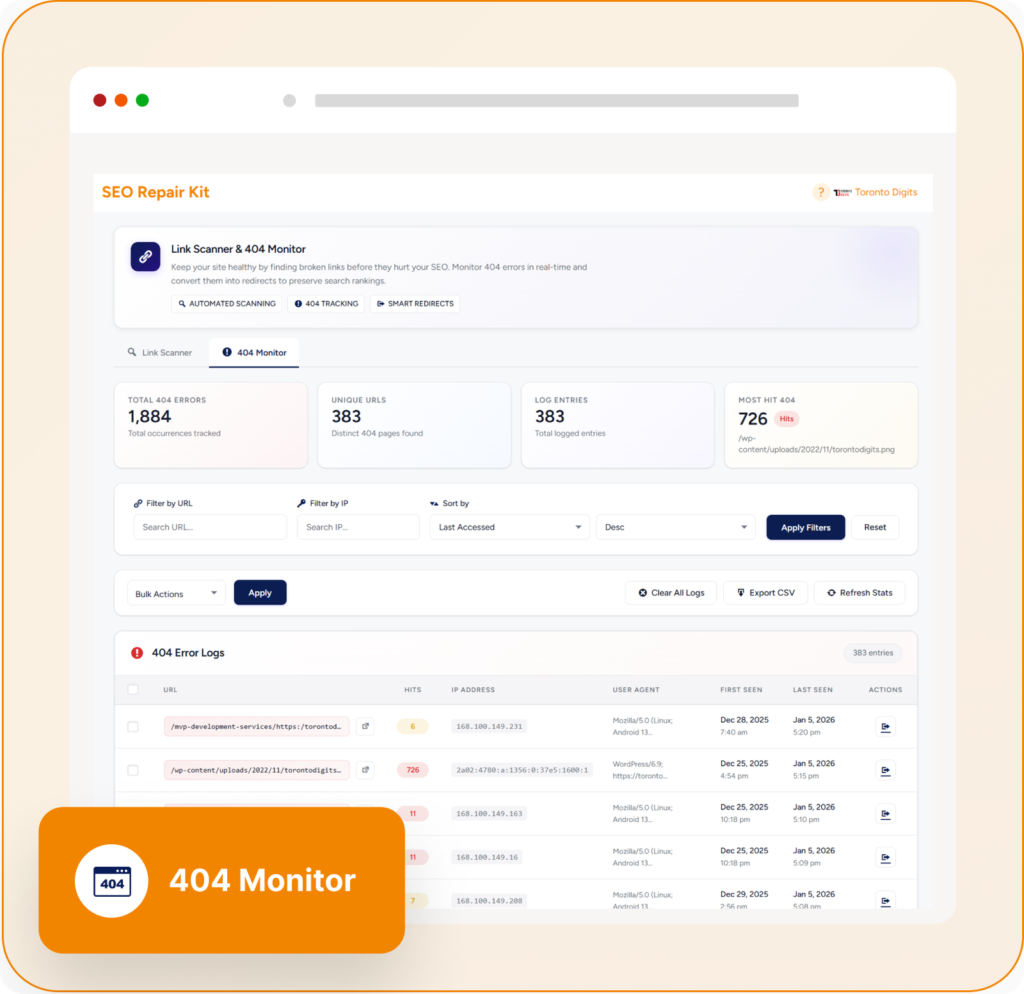
Key Features of SEO Repair Kit 404 Monitor
Real-Time 404 Tracking
The 404 Monitor automatically detects missing pages the moment they are requested.
Instead of waiting for manual audits or customer complaints, you can instantly identify:
- Missing URLs
- Broken internal links
- Invalid external referrals
- Mistyped URLs
This allows you to respond before the issue affects a larger number of visitors.
Detailed Error Logs
Every recorded 404 error contains valuable diagnostic information, including:
- Requested URL
- Referrer source
- User agent information
- IP details
- Timestamp of occurrence
These insights make troubleshooting significantly easier and help identify the root cause of each issue.
One-Click Redirect Creation
One of the most powerful features of 404 Monitor is the ability to create redirects directly from error logs.
When a missing URL is discovered, you can quickly:
- Redirect visitors to the correct page
- Preserve SEO value
- Recover lost traffic
- Improve user experience
This eliminates the need to switch between multiple tools during the repair process.
Multi-Domain Monitoring
For agencies and businesses managing multiple websites, 404 Monitor provides centralized error tracking across domains.
This allows teams to:
- Monitor multiple properties
- Identify recurring issues
- Manage redirects efficiently
- Maintain SEO health across projects
Advanced Analytics and Reporting
Understanding error patterns is essential for long-term website optimization.
404 Monitor provides analytics that help you:
- Identify frequently requested missing pages
- Detect broken navigation paths
- Find outdated backlinks
- Prioritize fixes based on impact
These insights support smarter SEO decisions and better website maintenance.
Common 404 Issues You Can Detect
Broken Internal Links
Sometimes pages within your website link to URLs that no longer exist.
Example:
Old URL:
https://seorepairkit.com/.well-known/traffic-advice
Current URL:
https://seorepairkit.com/.well-known/traffic-advice
Without updating internal links, visitors may encounter a 404 page.
404 Monitor helps identify these broken connections so they can be corrected.
Deleted Product Pages
E-commerce websites frequently remove products that are no longer available.
If old product URLs remain indexed or linked from other pages, visitors may land on error pages.
Monitoring these URLs allows you to create relevant redirects and preserve traffic.
Website Migration Errors
During redesigns or domain migrations, URLs often change.
404 Monitor helps uncover:
- Missing redirects
- Broken migration paths
- Legacy URLs still receiving traffic
This ensures a smoother transition without sacrificing SEO performance.
External Backlinks Pointing to Missing Pages
Sometimes valuable backlinks continue pointing to pages that no longer exist.
By identifying these URLs, you can create redirects and recover authority that would otherwise be lost.
Benefits of Using 404 Monitor
Improve User Experience
Visitors are less likely to abandon your site when broken URLs are quickly resolved.
Protect SEO Rankings
Redirecting important missing pages helps preserve link equity and search visibility.
Save Time
Automated monitoring eliminates the need for constant manual checks.
Identify Technical Issues Faster
Detailed logs provide the information needed to diagnose and fix errors efficiently.
Maintain a Healthy Website Structure
Continuous monitoring ensures your website remains accessible to both users and search engines.
Best Practices for Managing 404 Errors
To get the most value from 404 Monitor:
- Review error logs regularly
- Fix broken internal links immediately
- Redirect valuable missing URLs
- Remove outdated URLs from your sitemap
- Investigate high-frequency errors
- Monitor traffic sources generating 404 requests
Consistent monitoring prevents small issues from becoming major SEO problems.
Final Thoughts
404 errors are inevitable as websites grow and evolve, but ignoring them can lead to lost traffic, poor user experiences, and missed SEO opportunities.
SEO Repair Kit’s 404 Monitor provides a complete solution for tracking, analyzing, and fixing missing pages in real time. With detailed error logs, redirect management, analytics, and multi-domain support, it helps website owners maintain a healthier website and stronger search performance.
If you’re serious about technical SEO and website maintenance, 404 Monitor is an essential tool for keeping your site error-free and user-friendly.