Successful SEO is built on data. Without accurate insights into keyword rankings, clicks, impressions, and search visibility, it’s difficult to know whether your optimization efforts are delivering results.
That’s where KeyTrack comes in.
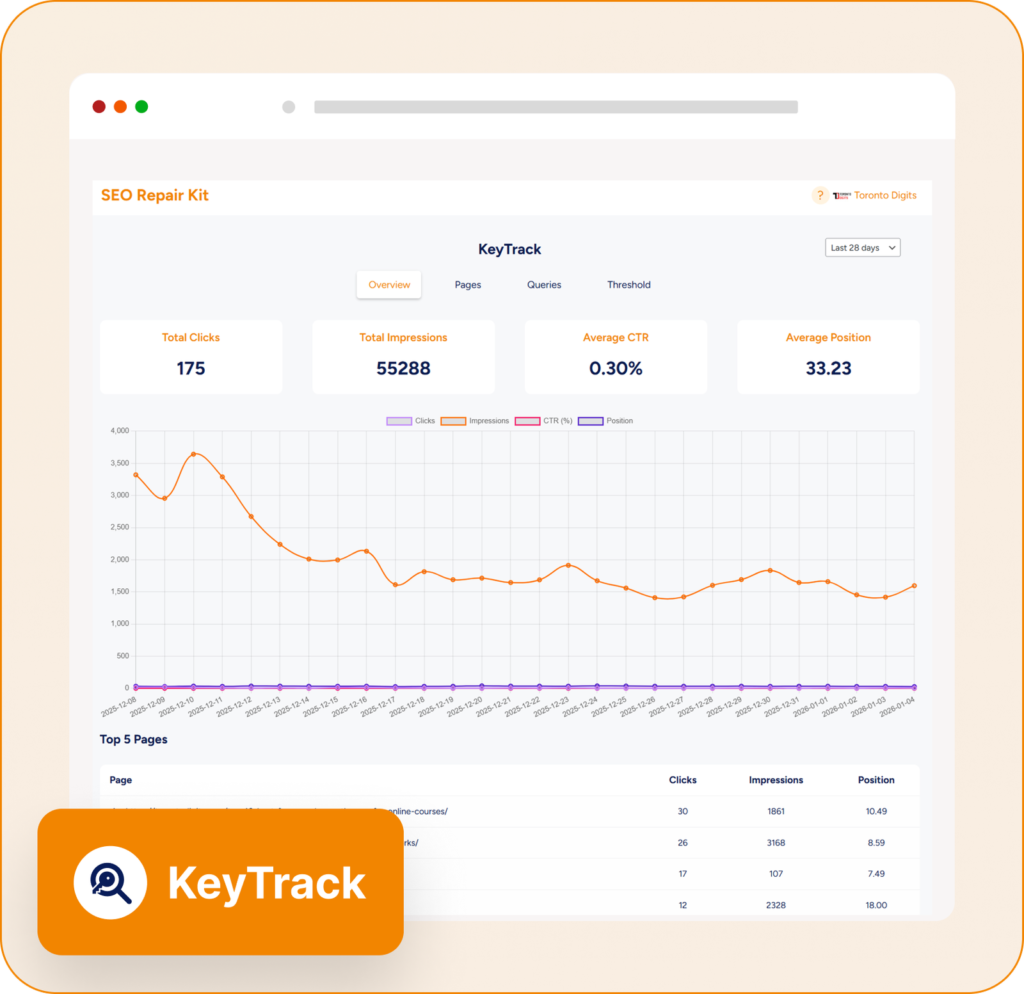
KeyTrack is a powerful SEO performance monitoring feature within SEO Repair Kit that helps website owners, marketers, and agencies track keyword performance directly from Google Search Console. By transforming complex search data into actionable insights, KeyTrack makes SEO reporting and performance analysis simpler than ever.
What Is KeyTrack?
KeyTrack is an advanced keyword tracking and SEO analytics tool integrated with Google Search Console. It provides real-time visibility into how your website performs in search results by tracking critical metrics such as:
- Keyword rankings
- Clicks
- Impressions
- Click-through rate (CTR)
- Page performance
- Search visibility trends
Instead of switching between multiple platforms, KeyTrack brings all your important SEO data into one centralized dashboard.
Why Keyword Tracking Matters
SEO isn’t a one-time task. Search rankings constantly change due to:
- Google algorithm updates
- Competitor activity
- Content updates
- User search behavior
- Industry trends
Without monitoring keyword performance, you may miss valuable opportunities to improve rankings or identify problems before they impact traffic.
Tracking SEO metrics allows you to:
- Measure campaign success
- Discover ranking opportunities
- Identify underperforming content
- Improve click-through rates
- Make data-driven decisions
KeyTrack helps automate this process and provides the insights needed to continuously improve search performance.
Key Features of KeyTrack
1. Keyword Performance Tracking
At the heart of KeyTrack is its ability to monitor keyword rankings and performance metrics.
You can track:
- Average keyword position
- Total impressions
- Search clicks
- Click-through rate (CTR)
- Ranking trends over time
This helps you understand which keywords are generating traffic and which require additional optimization.
2. Google Search Console Integration
KeyTrack seamlessly integrates with Google Search Console, allowing you to access valuable search performance data directly within your WordPress dashboard.
Benefits include:
- Real-time SEO insights
- Query performance analysis
- Search visibility monitoring
- Page-level performance tracking
- Centralized reporting
With all critical SEO metrics available in one location, workflow efficiency increases significantly.
3. Page Performance Analysis
Not every page performs equally.
KeyTrack helps identify:
- Top-performing pages
- Pages losing visibility
- High-impression pages with low CTR
- Content opportunities
By understanding which pages contribute most to organic traffic, you can focus optimization efforts where they matter most.
4. Automated SEO Reports
Manual reporting can consume hours every month.
KeyTrack simplifies reporting through automated email reports delivered on your preferred schedule:
- Weekly reports
- Bi-weekly reports
- Monthly reports
Reports include key SEO metrics, keyword performance summaries, and trend analysis, helping teams and clients stay informed without manual effort.
5. Customizable Date Ranges
SEO performance changes over time, making historical analysis essential.
KeyTrack allows users to:
- Compare different periods
- Track seasonal trends
- Measure campaign impact
- Analyze long-term growth
Flexible reporting periods provide deeper insights into what’s driving performance improvements.
6. Threshold-Based Notifications
One of KeyTrack’s most valuable features is proactive monitoring.
You can set performance thresholds and receive notifications when:
- Rankings drop significantly
- CTR decreases
- Traffic changes unexpectedly
- Important keywords gain visibility
These alerts allow you to react quickly before SEO issues affect overall performance.
7. Interactive Performance Visualization
Raw data can be difficult to interpret.
KeyTrack presents SEO metrics through visual reports and performance charts that help users:
- Spot ranking trends
- Monitor traffic growth
- Identify performance fluctuations
- Understand long-term SEO progress
Clear visualizations make SEO reporting easier for both technical and non-technical users.
How KeyTrack Helps Improve SEO
Identify High-Performing Keywords
Find keywords that already rank well and optimize surrounding content to maximize traffic potential.
Improve Underperforming Pages
Discover pages with strong impressions but low click-through rates and improve titles, meta descriptions, and content.
Monitor SEO Campaign Success
Track keyword movement after:
- Content updates
- Technical SEO improvements
- Link-building campaigns
- Website migrations
Make Data-Driven Decisions
Instead of relying on assumptions, use real search data to guide your SEO strategy and prioritize actions that generate measurable results.
Who Should Use KeyTrack?
KeyTrack is ideal for:
- SEO professionals
- Digital marketing agencies
- Bloggers
- E-commerce businesses
- Website owners
- Content marketers
- WordPress users
Whether you’re managing a single website or multiple client projects, KeyTrack simplifies performance monitoring and reporting.
Benefits of Using KeyTrack
Save Time on SEO Reporting
Automated reports eliminate repetitive manual tasks.
Improve Search Visibility
Track rankings and identify opportunities to increase organic traffic.
Monitor Performance in Real Time
Stay informed about changes in keyword rankings and search metrics.
Centralize SEO Data
Access critical performance information without switching between multiple platforms.
Support Better Decision Making
Use accurate search data to guide content, technical SEO, and marketing strategies.
Best Practices for Using KeyTrack
To maximize results:
- Track your most important target keywords
- Review performance reports regularly
- Monitor CTR alongside rankings
- Investigate sudden ranking changes
- Use trend analysis to identify opportunities
- Optimize pages with high impressions but low clicks
Consistent monitoring helps maintain and improve long-term search visibility.
Final Thoughts
SEO success depends on understanding how your website performs in search results. Without accurate data, improving rankings becomes a guessing game.
KeyTrack eliminates that uncertainty by combining keyword tracking, Google Search Console integration, performance analytics, automated reporting, and proactive notifications into one powerful solution.
Whether you’re managing your own website or handling multiple client projects, KeyTrack provides the insights needed to measure performance, identify opportunities, and make smarter SEO decisions.
If you’re looking for a simple yet powerful way to track rankings and monitor SEO growth, KeyTrack is one of the most valuable features available within SEO Repair Kit.