Blog

  • Schema Manager: Boost Search Visibility with Structured Data Made Simple

    Search engines work hard to understand website content, but they don’t always interpret information the same way humans do. That’s where schema markup comes in.

    Schema markup provides structured data that helps search engines better understand your content, making it eligible for enhanced search result features such as rich snippets, FAQs, product information, event details, and more.

    With Schema Manager in SEO Repair Kit, adding structured data to your website becomes simple, fast, and completely code-free.
    What Is Schema Manager?

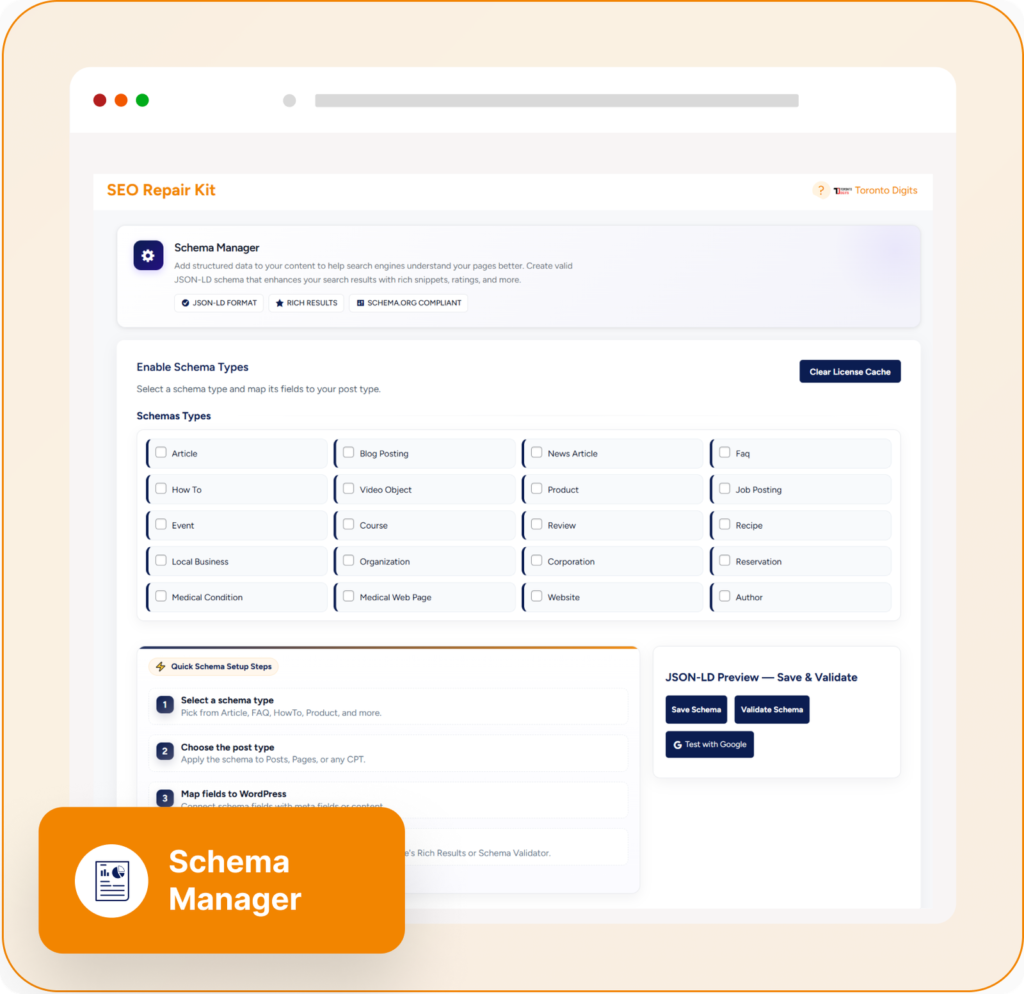
    Schema Manager is a powerful structured data management feature within SEO Repair Kit that allows website owners to add, manage, and customize schema markup across their website without writing JSON-LD code manually.

    The feature includes a built-in schema markup generator that supports multiple schema types and automatically injects valid structured data into your pages. This helps search engines better understand your content and improves your chances of appearing in rich search results.

    What Is Schema Markup?

    Schema markup is a form of structured data that provides additional context about your content to search engines.

    For example, schema can tell Google that a page contains:

    • An article
    • A product
    • A frequently asked question (FAQ)
    • An event
    • A local business
    • A review
    • A service
    • A recipe

    This extra information helps search engines display richer and more informative search results. Structured data is widely recognized as an important component of modern SEO because it improves content understanding and eligibility for rich results.

    Why Schema Markup Matters for SEO

    Without structured data, search engines rely primarily on page content and metadata to understand your website.

    Schema markup helps by:

    • Improving content understanding
    • Increasing search visibility
    • Enhancing rich result eligibility
    • Improving click-through rates (CTR)
    • Providing better context for search engines
    • Supporting advanced search features

    Many SEO professionals consider schema an important part of technical SEO because it helps search engines interpret content more accurately.

    Key Features of Schema Manager

    1. No Coding Required

    One of the biggest challenges with schema implementation is creating valid JSON-LD markup.

    Schema Manager eliminates this complexity by providing a user-friendly interface where you can create and deploy structured data without touching code.

    Simply choose a schema type, configure the settings, and publish.

    2. Multiple Schema Types Supported

    Schema Manager supports a wide range of structured data types, including:

    • Article Schema
    • Product Schema
    • FAQ Schema
    • Event Schema
    • Service Schema
    • Organization Schema
    • Local Business Schema
    • Review Schema
    • Breadcrumb Schema

    The platform supports multiple schema configurations, making it suitable for blogs, e-commerce stores, business websites, and content publishers.

    3. Guided Setup Wizard

    Implementing schema can be intimidating for beginners.

    Schema Manager includes a guided configuration process that helps users:

    • Select schema types
    • Map content fields
    • Configure required properties
    • Preview structured data
    • Publish markup correctly

    This reduces implementation errors and simplifies structured data management.

    4. Automatic JSON-LD Generation

    Search engines recommend JSON-LD as a preferred structured data format.

    Schema Manager automatically generates clean JSON-LD markup and injects it into your website pages, ensuring compatibility with modern search engines.

    5. Visual Field Mapping

    Every website stores content differently.

    Schema Manager includes visual field mapping capabilities that allow users to connect WordPress content fields directly to schema properties.

    For example:

    • Post title → Headline
    • Featured image → Image
    • Publish date → Date Published
    • Author name → Author

    This ensures your schema remains accurate and scalable.

    6. Rich Search Result Optimization

    Rich results often stand out in search engine results pages.

    Schema Manager helps make your content eligible for features such as:

    • FAQ dropdowns
    • Product information displays
    • Event listings
    • Review ratings
    • Breadcrumb navigation

    These enhanced search appearances can attract more attention and increase clicks.

    Common SEO Problems Schema Manager Solves

    Missing Structured Data

    Many websites publish content without schema markup, limiting search engine understanding.

    Schema Manager fills this gap with automated structured data implementation.

    Manual Coding Errors

    Hand-written schema often contains syntax errors that prevent search engines from reading it correctly.

    Automated generation minimizes mistakes and improves accuracy.

    Inconsistent Schema Across Pages

    Large websites frequently have inconsistent markup.

    Schema Manager standardizes structured data implementation across content types.

    Difficulty Managing Multiple Schema Types

    As websites grow, managing different schemas manually becomes difficult.

    Schema Manager centralizes all schema management into one dashboard.

    Benefits of Using Schema Manager

    Improve Search Visibility

    Structured data helps search engines understand and categorize your content more effectively.

    Increase Click-Through Rates

    Enhanced search listings often attract more attention than standard search results.

    Save Time

    Automated schema generation eliminates the need for manual coding.

    Simplify Technical SEO

    Even non-technical users can implement advanced structured data.

    Future-Proof Your SEO Strategy

    As search engines continue evolving, structured data remains an important way to communicate content meaning and context.

    Who Should Use Schema Manager?

    Schema Manager is ideal for:

    • Bloggers
    • Content publishers
    • E-commerce websites
    • SEO professionals
    • Digital marketing agencies
    • Local businesses
    • Service providers
    • WordPress website owners

    Whether you’re running a small blog or a large business website, structured data can help improve search performance and visibility.

    Best Practices for Schema Implementation

    To maximize the value of Schema Manager:

    • Use the most relevant schema type for each page
    • Ensure schema matches visible page content
    • Validate markup regularly
    • Add FAQ schema where appropriate
    • Use Product schema for e-commerce pages
    • Apply Article schema to blog content
    • Keep schema information accurate and up to date

    Following these best practices helps search engines trust and understand your structured data.

    Final Thoughts

    Schema markup is one of the most effective ways to help search engines understand your content and unlock enhanced search result opportunities.

    SEO Repair Kit’s Schema Manager removes the technical complexity of structured data implementation by providing an easy-to-use interface, automated JSON-LD generation, multiple schema types, visual field mapping, and guided setup tools.

    If you want to improve search visibility, increase click-through rates, and strengthen your technical SEO strategy, Schema Manager provides everything needed to implement structured data effectively—without writing a single line of code.
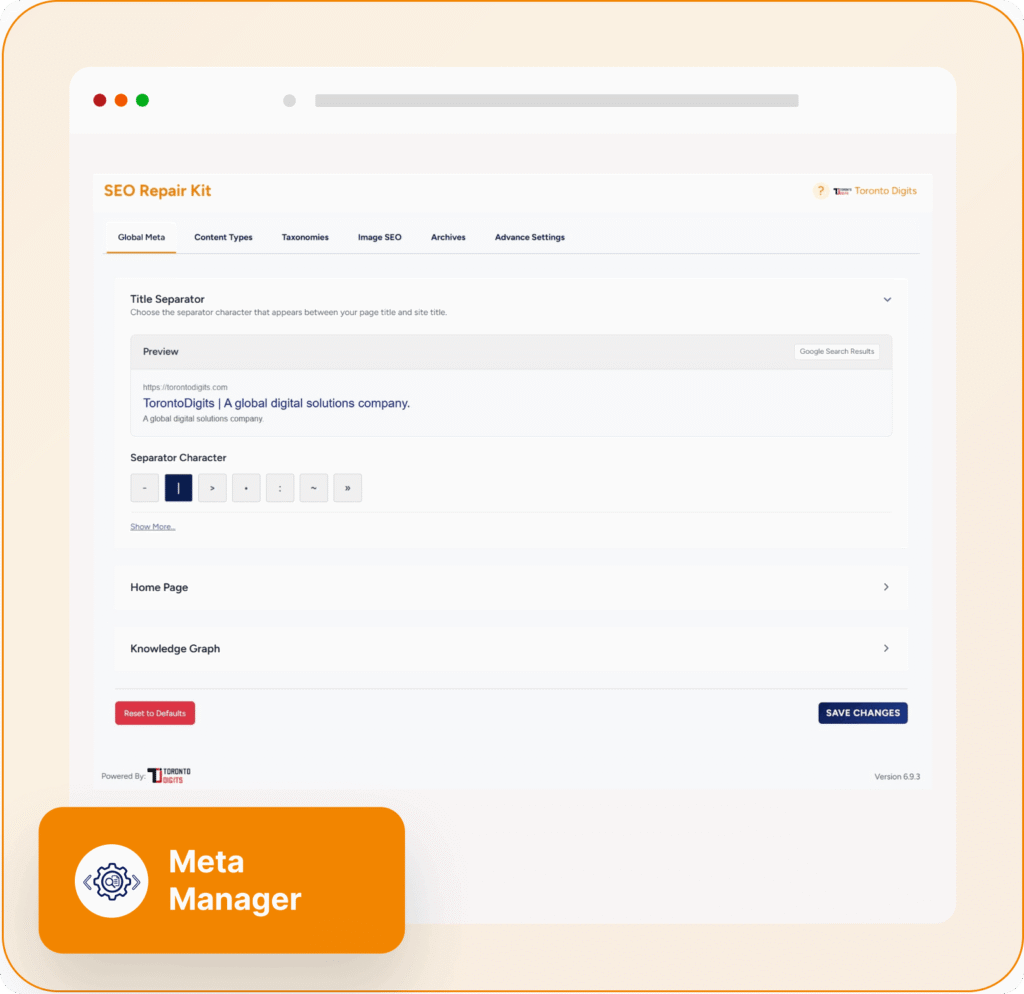
  • Meta Manager: Take Full Control of Your Website’s SEO Metadata

    Search engines rely heavily on metadata to understand, index, and rank your website content. Without properly optimized meta titles, descriptions, and robots directives, even high-quality content can struggle to achieve its full visibility potential.

    That’s why SEO Repair Kit includes Meta Manager, a powerful feature designed to simplify metadata management and help website owners optimize every page for search engines.

    Whether you’re managing a blog, business website, online store, or agency portfolio, Meta Manager gives you complete control over your website’s SEO metadata from one centralized dashboard.

    What Is Meta Manager?

    Meta Manager is an SEO metadata management system within SEO Repair Kit that allows you to create, customize, and manage essential SEO elements across your entire website.

    It helps you control:

    • SEO titles
    • Meta descriptions
    • Robots directives
    • Canonical URLs
    • SEO templates
    • Dynamic SEO variables
    • Search result previews

    Instead of manually editing every page individually, Meta Manager allows you to automate and standardize SEO metadata across your website while maintaining the flexibility to customize specific pages when needed.

    Why Metadata Matters for SEO

    Metadata plays a critical role in helping search engines understand your content.

    Properly optimized metadata can help:

    • Improve search visibility
    • Increase click-through rates (CTR)
    • Improve content indexing
    • Prevent duplicate content issues
    • Guide search engine crawling
    • Enhance user experience in search results

    A well-crafted title and meta description can often make the difference between a user clicking your result or choosing a competitor’s listing.

    Key Features of Meta Manager

    1. Centralized Metadata Management

    Meta Manager provides a single location where you can control SEO settings across your website.

    Instead of editing metadata page by page, you can manage:

    • Posts
    • Pages
    • Custom post types
    • Categories
    • Tags
    • Taxonomies
    • Archive pages

    This centralized approach saves time and ensures consistency across your entire website.

    2. SEO Title Management

    Page titles are one of the most important ranking signals in SEO.

    Meta Manager allows you to:

    • Create custom SEO titles
    • Set default title templates
    • Control title formatting
    • Use dynamic variables

    Optimized titles help search engines understand page topics while encouraging users to click your listing in search results.

    3. Meta Description Optimization

    Meta descriptions provide users with a preview of your content before they visit your website.

    With Meta Manager, you can:

    • Create custom descriptions
    • Set automated description templates
    • Maintain consistent messaging
    • Improve search result appearance

    Well-written descriptions can significantly improve click-through rates and attract more qualified visitors.

    4. Dynamic SEO Templates

    Managing metadata manually becomes difficult as websites grow.

    Meta Manager solves this problem through dynamic templates that automatically generate metadata using variables such as:

    • Post title
    • Site title
    • Excerpt
    • Category name
    • Author information

    This ensures every page has optimized metadata without requiring manual input for each piece of content.

    5. Robots Directive Control

    Not every page should be indexed by search engines.

    Meta Manager allows you to configure robots settings including:

    • Index / Noindex
    • Follow / Nofollow
    • Max image preview settings
    • Search appearance controls

    This helps guide search engines toward your most valuable content while excluding pages that should remain hidden from search results.

    6. Canonical URL Management

    Duplicate content can create confusion for search engines and dilute ranking signals.

    Meta Manager provides canonical URL controls that help:

    • Consolidate ranking signals
    • Prevent duplicate content issues
    • Improve indexing accuracy
    • Maintain SEO authority

    Proper canonicalization ensures search engines know which version of a page should be prioritized.

    7. Search Result Preview

    One of the most useful features is the built-in search preview functionality.

    Before publishing content, you can see how your page may appear in search results, allowing you to:

    • Optimize title length
    • Improve descriptions
    • Enhance click appeal
    • Maintain brand consistency

    This helps ensure your listings look professional and attractive to potential visitors.

    8. Gutenberg and Elementor Integration

    Meta Manager integrates seamlessly with popular WordPress editors, including:

    • Gutenberg Block Editor
    • Elementor
    • Classic Editor

    This allows you to manage SEO metadata directly while creating or editing content, streamlining your workflow and improving productivity.

    Common SEO Problems Meta Manager Solves

    Missing Meta Titles

    Pages without optimized titles often struggle to rank and attract clicks.

    Meta Manager automatically generates SEO-friendly titles using customizable templates.

    Duplicate Meta Descriptions

    Large websites frequently have duplicate descriptions across multiple pages.

    Dynamic templates help ensure unique and relevant descriptions throughout your site.

    Incorrect Indexing

    Some pages should not appear in search results.

    Robots directives allow you to control which content search engines can index and crawl.

    Inconsistent SEO Structure

    Different authors often create inconsistent metadata styles.

    Meta Manager standardizes optimization across all content types and sections of your website.

    Benefits of Using Meta Manager

    Improve Search Visibility

    Optimized metadata helps search engines better understand your content and improve rankings.

    Increase Click-Through Rates

    Compelling titles and descriptions encourage more users to visit your website.

    Save Time Through Automation

    Dynamic templates eliminate repetitive manual optimization tasks.

    Maintain SEO Consistency

    Ensure every page follows your SEO strategy and branding guidelines.

    Scale SEO Efforts Efficiently

    Manage metadata for hundreds or thousands of pages without additional workload.

    Who Should Use Meta Manager?

    Meta Manager is ideal for:

    • Bloggers
    • SEO professionals
    • Digital marketing agencies
    • E-commerce stores
    • Business websites
    • Content publishers
    • WordPress website owners

    Whether you manage a small website or a large content platform, Meta Manager simplifies metadata optimization and improves SEO efficiency.

    Best Practices for Using Meta Manager

    To maximize results:

    • Write unique SEO titles whenever possible
    • Create compelling meta descriptions
    • Use dynamic templates for scalability
    • Configure robots directives carefully
    • Review search previews before publishing
    • Set canonical URLs for duplicate or similar content
    • Regularly audit metadata performance

    Following these practices helps improve both search visibility and user engagement.

    Final Thoughts

    Metadata remains one of the most important foundations of successful SEO. Search engines rely on titles, descriptions, canonical URLs, and robots directives to understand and rank your content effectively.

    SEO Repair Kit’s Meta Manager simplifies the entire optimization process by providing centralized control, automation, dynamic templates, search previews, and advanced metadata settings in one easy-to-use interface.

    If you’re looking to improve search visibility, increase click-through rates, and manage SEO metadata more efficiently, Meta Manager is an essential tool for building a stronger and more scalable SEO strategy.

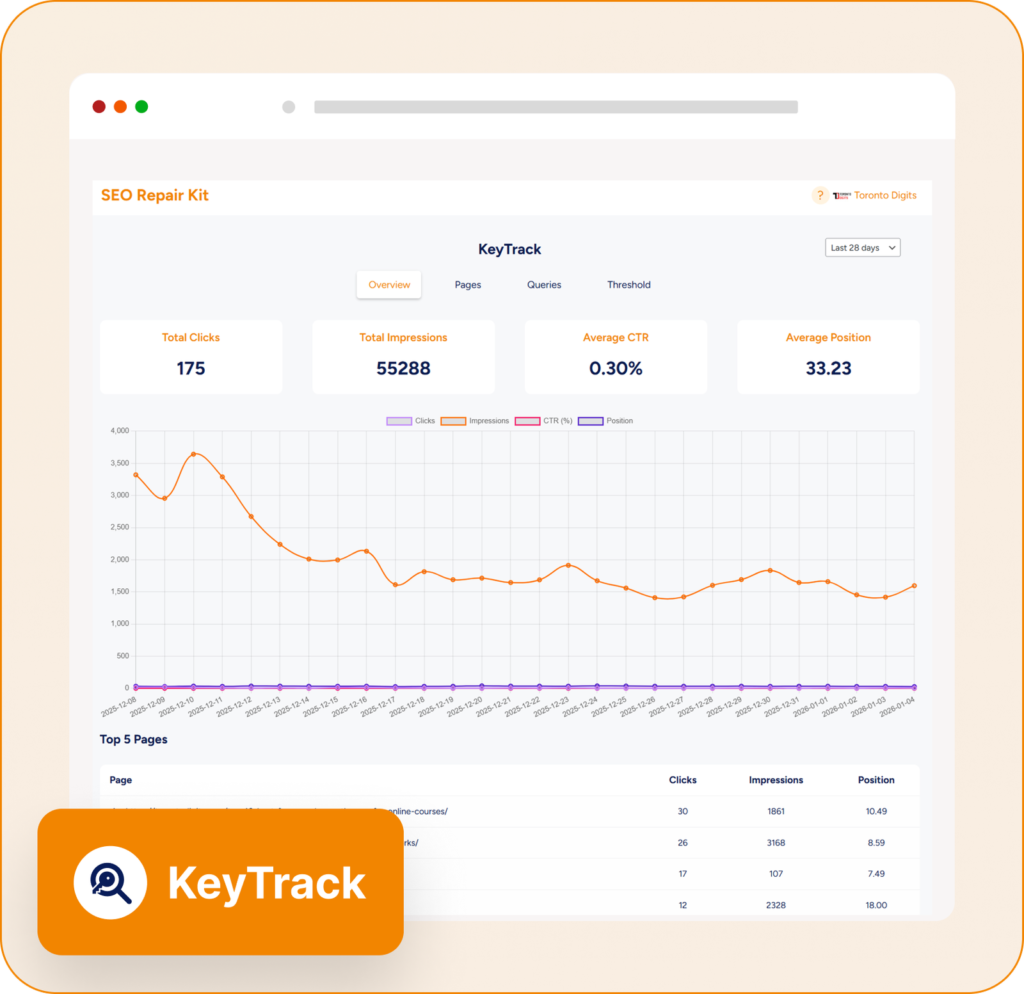
  • KeyTrack: Track Keyword Rankings and SEO Performance with Google Search Console Integration

    Successful SEO is built on data. Without accurate insights into keyword rankings, clicks, impressions, and search visibility, it’s difficult to know whether your optimization efforts are delivering results.

    That’s where KeyTrack comes in.

    KeyTrack is a powerful SEO performance monitoring feature within SEO Repair Kit that helps website owners, marketers, and agencies track keyword performance directly from Google Search Console. By transforming complex search data into actionable insights, KeyTrack makes SEO reporting and performance analysis simpler than ever.

    What Is KeyTrack?

    KeyTrack is an advanced keyword tracking and SEO analytics tool integrated with Google Search Console. It provides real-time visibility into how your website performs in search results by tracking critical metrics such as:

    • Keyword rankings
    • Clicks
    • Impressions
    • Click-through rate (CTR)
    • Page performance
    • Search visibility trends

    Instead of switching between multiple platforms, KeyTrack brings all your important SEO data into one centralized dashboard.

    Why Keyword Tracking Matters

    SEO isn’t a one-time task. Search rankings constantly change due to:

    • Google algorithm updates
    • Competitor activity
    • Content updates
    • User search behavior
    • Industry trends

    Without monitoring keyword performance, you may miss valuable opportunities to improve rankings or identify problems before they impact traffic.

    Tracking SEO metrics allows you to:

    • Measure campaign success
    • Discover ranking opportunities
    • Identify underperforming content
    • Improve click-through rates
    • Make data-driven decisions

    KeyTrack helps automate this process and provides the insights needed to continuously improve search performance.

    Key Features of KeyTrack

    1. Keyword Performance Tracking

    At the heart of KeyTrack is its ability to monitor keyword rankings and performance metrics.

    You can track:

    • Average keyword position
    • Total impressions
    • Search clicks
    • Click-through rate (CTR)
    • Ranking trends over time

    This helps you understand which keywords are generating traffic and which require additional optimization.

    2. Google Search Console Integration

    KeyTrack seamlessly integrates with Google Search Console, allowing you to access valuable search performance data directly within your WordPress dashboard.

    Benefits include:

    • Real-time SEO insights
    • Query performance analysis
    • Search visibility monitoring
    • Page-level performance tracking
    • Centralized reporting

    With all critical SEO metrics available in one location, workflow efficiency increases significantly.

    3. Page Performance Analysis

    Not every page performs equally.

    KeyTrack helps identify:

    • Top-performing pages
    • Pages losing visibility
    • High-impression pages with low CTR
    • Content opportunities

    By understanding which pages contribute most to organic traffic, you can focus optimization efforts where they matter most.

    4. Automated SEO Reports

    Manual reporting can consume hours every month.

    KeyTrack simplifies reporting through automated email reports delivered on your preferred schedule:

    • Weekly reports
    • Bi-weekly reports
    • Monthly reports

    Reports include key SEO metrics, keyword performance summaries, and trend analysis, helping teams and clients stay informed without manual effort.

    5. Customizable Date Ranges

    SEO performance changes over time, making historical analysis essential.

    KeyTrack allows users to:

    • Compare different periods
    • Track seasonal trends
    • Measure campaign impact
    • Analyze long-term growth

    Flexible reporting periods provide deeper insights into what’s driving performance improvements.

    6. Threshold-Based Notifications

    One of KeyTrack’s most valuable features is proactive monitoring.

    You can set performance thresholds and receive notifications when:

    • Rankings drop significantly
    • CTR decreases
    • Traffic changes unexpectedly
    • Important keywords gain visibility

    These alerts allow you to react quickly before SEO issues affect overall performance.

    7. Interactive Performance Visualization

    Raw data can be difficult to interpret.

    KeyTrack presents SEO metrics through visual reports and performance charts that help users:

    • Spot ranking trends
    • Monitor traffic growth
    • Identify performance fluctuations
    • Understand long-term SEO progress

    Clear visualizations make SEO reporting easier for both technical and non-technical users.

    How KeyTrack Helps Improve SEO

    Identify High-Performing Keywords

    Find keywords that already rank well and optimize surrounding content to maximize traffic potential.

    Improve Underperforming Pages

    Discover pages with strong impressions but low click-through rates and improve titles, meta descriptions, and content.

    Monitor SEO Campaign Success

    Track keyword movement after:

    • Content updates
    • Technical SEO improvements
    • Link-building campaigns
    • Website migrations

    Make Data-Driven Decisions

    Instead of relying on assumptions, use real search data to guide your SEO strategy and prioritize actions that generate measurable results.

    Who Should Use KeyTrack?

    KeyTrack is ideal for:

    • SEO professionals
    • Digital marketing agencies
    • Bloggers
    • E-commerce businesses
    • Website owners
    • Content marketers
    • WordPress users

    Whether you’re managing a single website or multiple client projects, KeyTrack simplifies performance monitoring and reporting.

    Benefits of Using KeyTrack

    Save Time on SEO Reporting

    Automated reports eliminate repetitive manual tasks.

    Improve Search Visibility

    Track rankings and identify opportunities to increase organic traffic.

    Monitor Performance in Real Time

    Stay informed about changes in keyword rankings and search metrics.

    Centralize SEO Data

    Access critical performance information without switching between multiple platforms.

    Support Better Decision Making

    Use accurate search data to guide content, technical SEO, and marketing strategies.

    Best Practices for Using KeyTrack

    To maximize results:

    • Track your most important target keywords
    • Review performance reports regularly
    • Monitor CTR alongside rankings
    • Investigate sudden ranking changes
    • Use trend analysis to identify opportunities
    • Optimize pages with high impressions but low clicks

    Consistent monitoring helps maintain and improve long-term search visibility.

    Final Thoughts

    SEO success depends on understanding how your website performs in search results. Without accurate data, improving rankings becomes a guessing game.

    KeyTrack eliminates that uncertainty by combining keyword tracking, Google Search Console integration, performance analytics, automated reporting, and proactive notifications into one powerful solution.

    Whether you’re managing your own website or handling multiple client projects, KeyTrack provides the insights needed to measure performance, identify opportunities, and make smarter SEO decisions.

    If you’re looking for a simple yet powerful way to track rankings and monitor SEO growth, KeyTrack is one of the most valuable features available within SEO Repair Kit.

  • 301 Redirection: Preserve SEO Rankings and Fix Broken URLs with SEO Repair Kit

    Website URLs change for many reasons. You may redesign your site, update page slugs, remove outdated content, or migrate to a new domain. While these changes are often necessary, they can create broken links, 404 errors, and lost search engine rankings if not handled correctly.

    This is where 301 Redirection in SEO Repair Kit becomes essential.

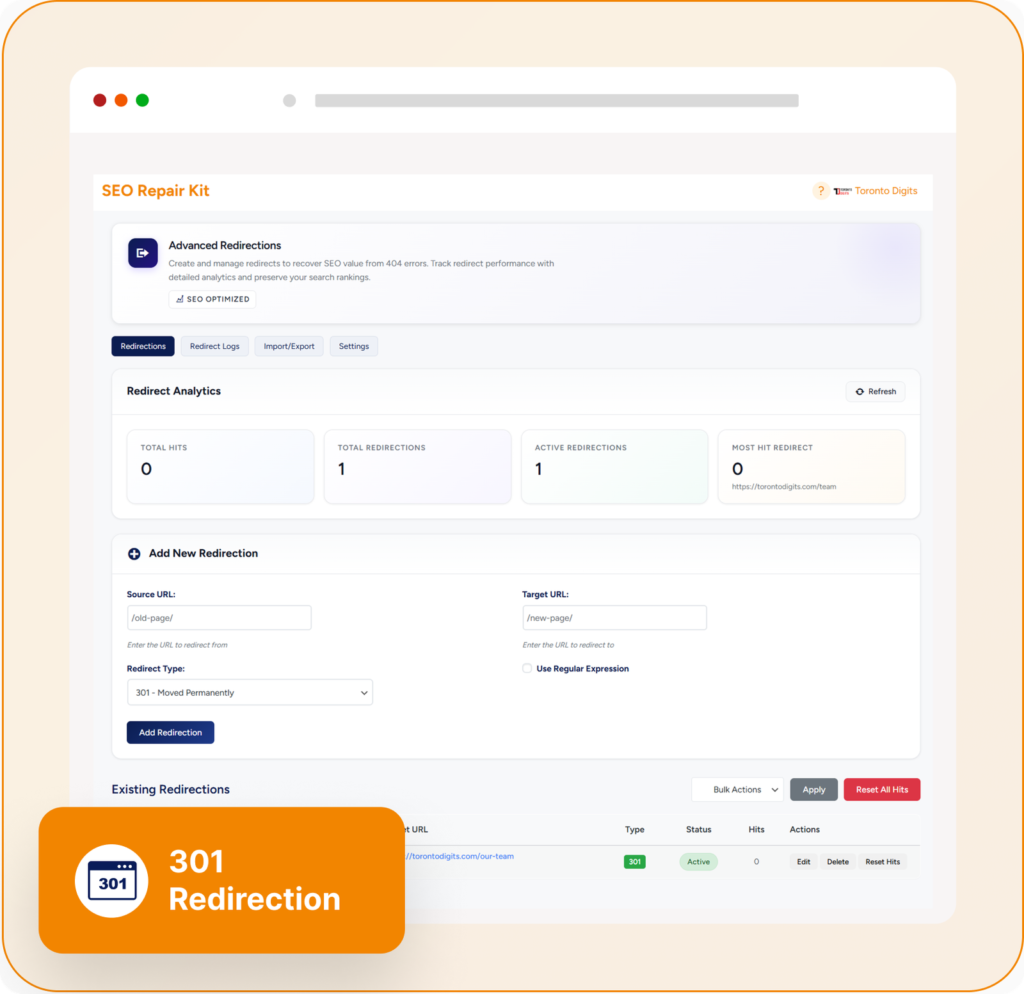
    The feature provides a powerful and user-friendly way to manage URL redirects, ensuring visitors and search engines are always directed to the correct destination while preserving your hard-earned SEO value. . dashboard without editing server files manually. campaigns.

    Having support for both redirect types gives website owners greater flexibility. helps identify important URLs and optimize redirection strategies. enterprise websites managing thousands of pages. management

    This helps maintain a clean and efficient redirect structure. traffic during migration.

  • 404 Monitor: Detect, Track, and Fix Website Errors Before They Hurt Your SEO

    Broken pages are one of the most common technical SEO issues affecting websites today. Whether caused by deleted content, URL changes, website migrations, or broken links, 404 errors can create a poor user experience and make it harder for search engines to crawl your site effectively.

    That’s why SEO Repair Kit includes a powerful 404 Monitor feature that helps website owners identify, track, and resolve 404 errors before they impact rankings and visitors.

    What Is a 404 Error?

    A 404 error occurs when a visitor or search engine requests a page that no longer exists on your website.

    Common causes include:

    • Deleted pages
    • Changed URLs
    • Broken internal links
    • Outdated backlinks
    • Incorrectly typed URLs
    • Website redesigns and migrations

    When users encounter a 404 page, they are unable to access the content they expected, which often leads to frustration and increased bounce rates.

    What Is 404 Monitor?

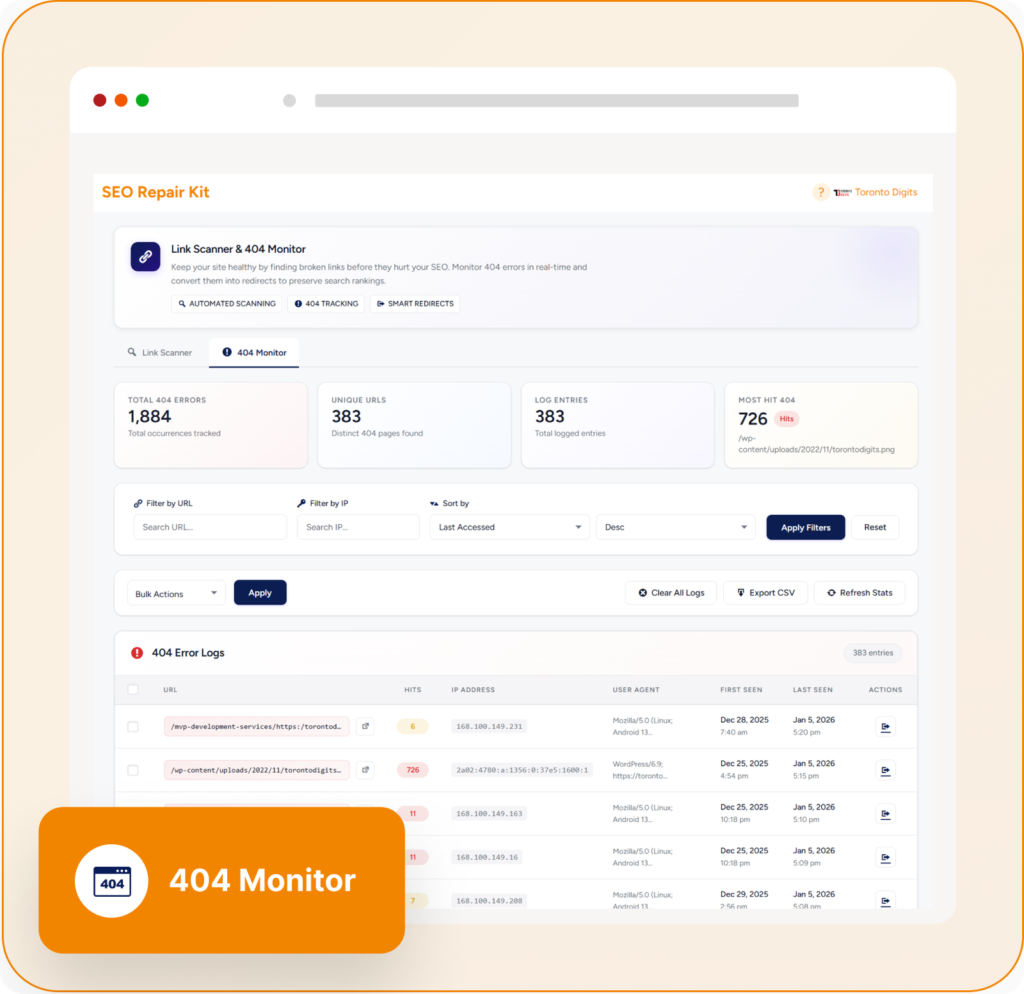
    404 Monitor is a real-time error tracking system within SEO Repair Kit that automatically logs every 404 error occurring on your website.

    Instead of manually searching for broken URLs, the system continuously monitors incoming requests and records valuable information that helps you identify and fix issues quickly.

    Why Monitoring 404 Errors Matters

    Many website owners don’t realize how many visitors land on missing pages every day.

    Ignoring these errors can lead to:

    • Poor user experience
    • Lost website traffic
    • Reduced engagement
    • Wasted crawl resources
    • Missed conversion opportunities
    • Loss of valuable link equity

    A proactive 404 monitoring strategy helps maintain a healthy website structure and ensures visitors reach the content they need.

    Key Features of SEO Repair Kit 404 Monitor

    Real-Time 404 Tracking

    The 404 Monitor automatically detects missing pages the moment they are requested.

    Instead of waiting for manual audits or customer complaints, you can instantly identify:

    • Missing URLs
    • Broken internal links
    • Invalid external referrals
    • Mistyped URLs

    This allows you to respond before the issue affects a larger number of visitors.

    Detailed Error Logs

    Every recorded 404 error contains valuable diagnostic information, including:

    • Requested URL
    • Referrer source
    • User agent information
    • IP details
    • Timestamp of occurrence

    These insights make troubleshooting significantly easier and help identify the root cause of each issue.

    One-Click Redirect Creation

    One of the most powerful features of 404 Monitor is the ability to create redirects directly from error logs.

    When a missing URL is discovered, you can quickly:

    • Redirect visitors to the correct page
    • Preserve SEO value
    • Recover lost traffic
    • Improve user experience

    This eliminates the need to switch between multiple tools during the repair process.

    Multi-Domain Monitoring

    For agencies and businesses managing multiple websites, 404 Monitor provides centralized error tracking across domains.

    This allows teams to:

    • Monitor multiple properties
    • Identify recurring issues
    • Manage redirects efficiently
    • Maintain SEO health across projects

    Advanced Analytics and Reporting

    Understanding error patterns is essential for long-term website optimization.

    404 Monitor provides analytics that help you:

    • Identify frequently requested missing pages
    • Detect broken navigation paths
    • Find outdated backlinks
    • Prioritize fixes based on impact

    These insights support smarter SEO decisions and better website maintenance.

    Common 404 Issues You Can Detect

    Broken Internal Links

    Sometimes pages within your website link to URLs that no longer exist.

    Example:

    Old URL:
    https://seorepairkit.com/.well-known/traffic-advice

    Current URL:
    https://seorepairkit.com/.well-known/traffic-advice

    Without updating internal links, visitors may encounter a 404 page.

    404 Monitor helps identify these broken connections so they can be corrected.

    Deleted Product Pages

    E-commerce websites frequently remove products that are no longer available.

    If old product URLs remain indexed or linked from other pages, visitors may land on error pages.

    Monitoring these URLs allows you to create relevant redirects and preserve traffic.

    Website Migration Errors

    During redesigns or domain migrations, URLs often change.

    404 Monitor helps uncover:

    • Missing redirects
    • Broken migration paths
    • Legacy URLs still receiving traffic

    This ensures a smoother transition without sacrificing SEO performance.

    External Backlinks Pointing to Missing Pages

    Sometimes valuable backlinks continue pointing to pages that no longer exist.

    By identifying these URLs, you can create redirects and recover authority that would otherwise be lost.

    Benefits of Using 404 Monitor

    Improve User Experience

    Visitors are less likely to abandon your site when broken URLs are quickly resolved.

    Protect SEO Rankings

    Redirecting important missing pages helps preserve link equity and search visibility.

    Save Time

    Automated monitoring eliminates the need for constant manual checks.

    Identify Technical Issues Faster

    Detailed logs provide the information needed to diagnose and fix errors efficiently.

    Maintain a Healthy Website Structure

    Continuous monitoring ensures your website remains accessible to both users and search engines.

    Best Practices for Managing 404 Errors

    To get the most value from 404 Monitor:

    • Review error logs regularly
    • Fix broken internal links immediately
    • Redirect valuable missing URLs
    • Remove outdated URLs from your sitemap
    • Investigate high-frequency errors
    • Monitor traffic sources generating 404 requests

    Consistent monitoring prevents small issues from becoming major SEO problems.

    Final Thoughts

    404 errors are inevitable as websites grow and evolve, but ignoring them can lead to lost traffic, poor user experiences, and missed SEO opportunities.

    SEO Repair Kit’s 404 Monitor provides a complete solution for tracking, analyzing, and fixing missing pages in real time. With detailed error logs, redirect management, analytics, and multi-domain support, it helps website owners maintain a healthier website and stronger search performance.

    If you’re serious about technical SEO and website maintenance, 404 Monitor is an essential tool for keeping your site error-free and user-friendly.

  • SEO Repair Kit Links Manager: The Smart Way to Manage Website Links and Improve SEO

    Maintaining a healthy website isn’t just about creating great content. Every internal and external link on your site plays a critical role in user experience, crawlability, and search engine rankings. As websites grow, manually checking hundreds or thousands of links becomes nearly impossible.

    That’s where the Links Manager feature in SEO Repair Kit comes in.

    What is Links Manager?

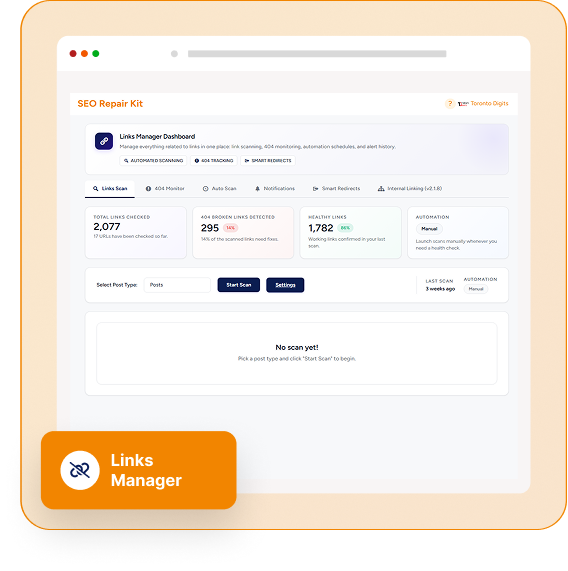
    Links Manager is a powerful link management and monitoring solution built into SEO Repair Kit. It provides a centralized dashboard where website owners, SEO professionals, and agencies can monitor, analyze, and manage all website links from one place.

    Instead of manually checking pages for broken links or redirect issues, Links Manager automatically scans your website and provides detailed insights into link health.

    Why Link Management Matters for SEO

    Broken and unhealthy links can negatively impact your website in several ways:

    • Poor user experience
    • Increased bounce rates
    • Lost link equity
    • Crawl inefficiencies
    • Reduced search engine trust
    • Missed ranking opportunities

    Regular link monitoring helps ensure that visitors and search engines can navigate your website without encountering dead ends or unnecessary redirects.

    Key Features of SEO Repair Kit Links Manager

    1. Comprehensive Link Scanning

    Links Manager scans both internal and external links across your website and identifies:

    • Healthy links
    • Broken links (404 error)
    • Redirected URLs
    • Server errors
    • Problematic links affecting performance

    This allows you to quickly discover issues before they impact users or search rankings.

    2. Centralized Link Dashboard

    Instead of reviewing links page by page, all link data is organized within a single dashboard.

    You can easily:

    • View link status
    • Monitor URL health
    • Analyze affected pages
    • Track issues across your entire website

    This centralized approach saves valuable time for website administrators and SEO teams.

    3. Integrated 404 Monitoring

    Links Manager works alongside the built-in 404 Monitor to detect missing pages and broken URLs in real time.

    This helps you:

    • Identify pages generating errors
    • Understand where visitors encounter issues
    • Take immediate corrective action

    A proactive approach to 404 management helps maintain a positive user experience.

    4. Quick Redirect Creation

    When a broken URL is discovered, you can create redirects directly from the link management interface.

    Benefits include:

    • Preserving SEO value
    • Preventing traffic loss
    • Improving navigation
    • Reducing manual work

    This streamlined workflow helps resolve issues much faster than traditional methods.

    5. Automated Link Scans

    One of the most valuable features is automation.

    Links Manager allows you to schedule scans:

    • Daily
    • Every few days
    • Weekly
    • Monthly

    Instead of manually checking links, the system continuously monitors your website and keeps you informed about new issues.

    6. Flexible Scan Configuration

    Website owners can customize scans based on their requirements, including:

    • Post types
    • Batch sizes
    • Number of links per scan
    • Request timeout settings

    This flexibility ensures optimal performance even on large websites.

    7. Export Reports with CSV

    Need to share findings with your team or clients?

    Links Manager provides CSV export functionality so you can:

    • Generate reports
    • Share audit results
    • Track progress
    • Document fixes

    This is especially useful for agencies managing multiple websites.

    8. Smart Redirect Support

    The feature also includes intelligent redirect capabilities that help manage broken internal URLs more efficiently.

    By automatically handling certain redirect scenarios, website owners can reduce manual maintenance while preserving SEO value.

    Benefits of Using Links Manager

    Improve User Experience

    Visitors expect every link to work correctly. By identifying and fixing broken links, you create a smoother browsing experience.

    Strengthen Website Structure

    Healthy internal linking improves content discoverability and helps search engines understand the relationship between pages.

    Protect SEO Performance

    Broken links and unresolved 404 errors can weaken your site’s SEO. Continuous monitoring helps protect rankings and authority.

    Save Time Through Automation

    Automated scans eliminate repetitive manual checks and allow website owners to focus on growth rather than maintenance.

    Simplify Website Maintenance

    Managing links, redirects, and errors from one dashboard significantly reduces the complexity of technical SEO management.

    Who Should Use Links Manager?

    Links Manager is ideal for:

    • SEO professionals
    • Digital marketing agencies
    • Bloggers
    • Content publishers
    • E-commerce websites
    • Business websites
    • WordPress site owners

    Whether you manage a small blog or a large enterprise website, maintaining healthy links is essential for long-term SEO success.

    Final Thoughts

    Website links are the foundation of navigation, user experience, and SEO. As websites expand, link management becomes increasingly difficult without the right tools.

    SEO Repair Kit’s Links Manager simplifies the entire process by combining link scanning, 404 monitoring, redirect management, automation, and reporting into a single powerful solution.

    If you want to maintain a healthier website, improve user experience, and protect your search engine rankings, Links Manager provides the tools needed to keep your link profile clean, organized, and optimized.